Understanding Apache Kafka: The Backbone of Modern Event-Driven Systems

A lot of the software systems we use today are distributed, event-driven, and asynchronous meaning the different parts run on their own but still talk to each other smoothly. And at the heart of this setup is one powerful technology used by companies like LinkedIn, Uber, Netflix, and Airbnb: Apache Kafka.
Kafka is an open-source event streaming platform built to handle massive data in real time. You can think of it as the central nervous system of your applications, it helps different services share information through events quickly and reliably.
In simple terms, Kafka is like a high-speed messaging backbone that connects the producers (senders) to the consumers (receivers), making sure everything runs fast, stable, and ready to scale.
What Exactly Is an Event?
In Kafka, everything starts with an event. An event is simply a record of something that happened; like a user logging in, a payment going through, a sensor picking up temperature, or a new product being added to inventory. These are the actions your application is designed to listen for.
Each event usually contains:
A key – an identifier (for example, a user ID)
A value – the main data (for instance:
{ “action”: “login”, “timestamp”: “...” })A timestamp – when the event happened
These events are constantly being created, sent, stored, and processed inside Kafka. They’re the lifeblood of real-time systems, the reason data moves smoothly and services stay in sync.
Producers: The Event Creators
A producer is any service or app that creates and sends events to Kafka. For example:
A mobile app sends user activity logs.
A payment service publishes transaction details.
A web server sends page view events.
Producers don’t need to know who’s listening. they simply send messages to a topic, and Kafka handles the rest. This decoupling makes systems easier to manage. When new consumers are added producers won’t need to change a single line of code.
When a producer writes a message, it sends it to a specific topic (like a named channel). Kafka then stores that message safely across one or more brokers, ensuring it’s available whenever needed.
Topics : Organizing the Stream of Data
A topic in Kafka is a logical category or channel where events are stored. Producers send messages here, and consumers pick them up for processing. Each topic typically holds one specific type of data. For example:
ordersuser-registrationsinventory-updates
This structure keeps everything organized. services can subscribe only to the topics they need instead of being flooded with unrelated data. If your service only handles user sign-ups, just listen to the user-registrations topic, simple and clean.
But Kafka goes beyond organization, it’s built for serious scale. Each topic is divided into smaller chunks called partitions, which distribute the workload across multiple servers. Even when processing millions of messages per second, Kafka runs smoothly without slowing down.
In short, topics make Kafka manageable, and partitions make it powerful enough to handle any scale, from a small startup to a global enterprise.
Partitions: Scaling and Ordering the Data
In Kafka, every topic is split into one or more partitions, and this is where the real magic happens.
A partition is simply an ordered, unchangeable list of messages stored on disk, often called a log. Each new message that comes in is added right at the end of this log, keeping everything in perfect time order.
This setup makes Kafka incredibly fast, because appending data to a file is one of the quickest operations your system can perform. No complicated rewrites, just write and move on.
Why partitions are so important:
They allow parallel processing — multiple consumers can read from different partitions at the same time without stepping on each other’s toes.
They make scaling easy — a topic can be spread across several partitions sitting on different brokers, so as your traffic grows, Kafka grows with you.
They maintain order within a partition — messages with the same key (say,
user_123) always go to the same partition, ensuring their sequence stays intact.
In simple terms:
Topics help you organize your data logically, while partitions handle the heavy lifting, scaling it physically and keeping everything in order.
That’s how Kafka stays both fast and reliable, whether you’re dealing with hundreds or billions of messages.
Consumers: The Event Listeners
A consumer is an application that reads and processes events from Kafka topics.
It subscribes to one or more topics and continuously listens for new messages.
For example:
An email service might consume “order placed” events to send receipts.
An analytics service might consume “page view” events to generate dashboards.
A fraud detection system might consume “login” and “transaction” events to detect suspicious behavior.
Kafka consumers have full control, they can process events immediately, in batches, or even replay them from the past thanks to Kafka’s persistent storage.
This is what makes Kafka different from traditional queues: it stores data durably and lets consumers re-read or backfill data as needed.
Consumer Groups: Load Balancing and Fault Tolerance
When dealing with large-scale systems, you rarely have just one consumer instance.
Instead, Kafka allows multiple consumers to work together in what’s called a consumer group.
Here’s how it works:
Each consumer in the group reads from a different partition of the topic.
Kafka ensures that each partition is read by exactly one consumer in the group.
If one consumer fails, another takes over automatically.
This setup provides both parallelism (for speed) and resilience (for fault tolerance).
If you’re familiar with Kubernetes replicas, a consumer group behaves similarly, multiple instances of the same application sharing the same group ID, working together to consume data efficiently.
Streams: Continuous Data in Motion
Kafka doesn’t just move messages, it moves streams of data.
A stream represents a continuous flow of key-value pairs that can be processed in real time.
Kafka provides a built-in Streams API, which allows developers to:
Filter data (e.g., only read “high-value” transactions)
Join multiple topics (e.g., combine
orderswithusers)Aggregate information over time (e.g., daily sales totals)
React to data as it happens (e.g., trigger alerts)
This streaming capability turns Kafka from a simple message bus into a real-time data processing platform, enabling event-driven applications, live dashboards, and continuous ETL pipelines.
Brokers: The Servers That Make It All Work
At the heart of Kafka are brokers, the servers that store, replicate, and serve data to producers and consumers.
Each broker:
Handles one or more partitions.
Stores data on disk in a fault-tolerant log format.
Coordinates with other brokers to ensure data availability.
A Kafka cluster is simply a group of these brokers working together.
When you produce an event, it’s sent to one broker, but Kafka automatically replicates it to others for durability and fault tolerance.
Even if one broker goes down, data remains safe and accessible.
Cluster Management : ZooKeeper and KRaft
In older versions of Kafka, cluster coordination is managed by Apache ZooKeeper, which keeps track of:
Which brokers are alive.
Which broker is the leader for each partition.
Configuration details and metadata.
However, newer versions of Kafka (2.8+) introduced KRaft (Kafka Raft), an internal consensus protocol that eliminates the need for ZooKeeper altogether.
KRaft makes Kafka clusters simpler to deploy, more self-contained, and easier to scale.
Both systems serve the same purpose:
To maintain consistency, leadership, and fault recovery across the Kafka cluster.
The Flow of Data in Kafka
Let’s put it all together:
Producer sends an event → chooses a topic.
Kafka assigns the event to a partition and stores it in a broker.
Consumers (grouped by consumer groups) read data from the partitions.
Cluster manager (ZooKeeper/KRaft) ensures the brokers are coordinated, balanced, and healthy.
This pipeline can handle millions of events per second, making it ideal for real-time analytics, logging, and microservice communication.
Why Kafka Matters
Kafka brings several advantages that traditional message brokers struggle with:
Scalability: Easily handle terabytes of data and millions of messages per second.
Durability: Data is persisted to disk, ensuring no loss even if a server crashes.
Performance: Sequential writes and zero-copy optimizations make it lightning-fast.
Replay-ability: Consumers can rewind and reprocess data from any point in time.
Decoupling: Producers and consumers evolve independently without tight coupling.
In essence, Kafka helps teams move from request-response systems (where services wait for each other) to event-driven systems (where services react asynchronously).
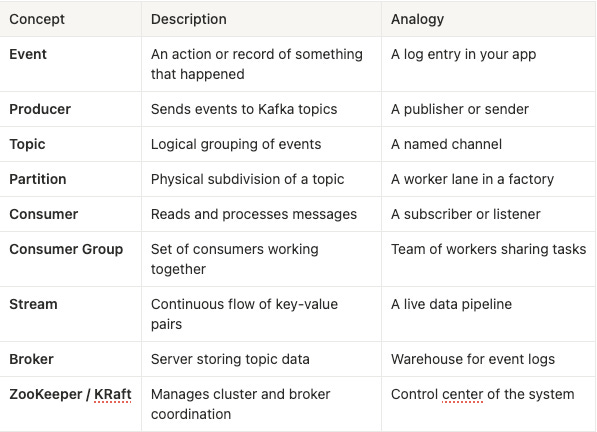
Summary Table
Final Thoughts
Apache Kafka is more than just a messaging queue, it’s an event backbone for modern data-driven systems.
It allows applications to communicate asynchronously, scale independently, and process massive data streams in real time.
Whether you’re building microservices, real-time dashboards, or AI-driven analytics pipelines, Kafka ensures that your data is always in motion, consistent, and available when needed.
In a world where milliseconds matter, Kafka keeps the pulse of your system alive.